

Best AP Software for Dynamics Multi-Entity Teams
Published by
Carl Robinette
on
Running accounts payable across several entities requires sophisticated solutions. Without a real understanding of multi-entity requirements and true integration to your ERP, even the most advanced accounts payable solutions can end up creating an even bigger mess. Every entity has its own vendors, bank accounts, approvers and coding rules, yet the controller still needs one clear view of what is owed and what has been paid.
The right accounts payable automation software removes the manual work between invoice arrival and vendor payment. The wrong one adds another system to reconcile. This guide covers what multi-entity Dynamics teams should look for and how the leading options compare.
What is the best AP Software for Multi-Entity Teams Using Dynamics ERP?
Short answer. Fidesic was built for multi-entity and multi-location busineses using Microsoft Dynamics. It combines direct ERP integration, AI invoice capture, approval workflows, built-in vendor payments and multi-entity support in one platform. Customers can process invoices on day one and reach 99% touchless accuracy by week six. Fidesic can also cut monthly invoice processing time in half compared to less effective automation.
What to look for in accounts payable automation software
Most AP platforms list similar features. The differences show up in how well they fit your ERP and your entity structure. Here are five things to consider when selecting AP automation for multi-entity or multi-location teams.
1. Dynamics ERP integration
Integration depth is the most important factor. Some platforms push data through flat files or middleware. Others work directly inside the ERP. Direct integration means fewer sync errors, faster GL updates and less IT overhead.
Weak integration is also the most common reason teams switch. Roughly one third of Fidesic's new clients cite a weak or failing ERP integration as a top reason they are looking to move to Fidesic.
Ask any vendor how it connects to Dynamics GP or Business Central, whether it relies on import tools, and who supports it when something breaks.
2. AI invoice capture
Every AP solution provider offers invoice capture. Not all of them are built from the ground up with multi-entity organizations in mind. AI invoice capture should turn PDFs and emailed invoices into clean ERP data without templates. Template-based OCR needs setup for every vendor and breaks when an invoice layout changes. Template-free capture handles new vendors from day one.
Look for line-item extraction, vendor matching and the ability to capture by location or entity so invoices land in the right place automatically. Ask for a measured accuracy rate and the timeline to reach it, not just a promise of high accuracy.
3. Invoice approval workflows
Multi-entity teams rarely have a single approval chain. A location manager may approve one invoice while a regional director approves another. Often, multiple approvers are required in a sequence that supports compliance and risk management. Strong invoice approval workflows support routing by entity, location, amount or GL account, and they let approvers act from anywhere within a hierarchy that removes ambiguity for the organization.
A visual workflow editor helps finance teams adjust rules without calling a consultant.
4. Vendor payments
Approved invoices still need to be paid. Platforms with built-in vendor payments let teams select invoices, create a batch and send ACH or paper checks without leaving the AP workflow. Security features such as Positive Pay for checks add protection against fraud.
Paper checks are still the most common target for payments fraud. According to the 2026 AFP Payments Fraud and Control Survey, 58% of organizations reported check fraud in 2025, more than ACH debits and wire transfers. Yet most organizations that use checks plan to keep using them, often because vendors require it. For multi-entity teams paying vendors from several bank accounts, that makes controls like Positive Pay essential.”
Also check whether payments post back to the ERP automatically. Manual reconciliation defeats the purpose of automation.
5. Multi-entity finance management
This is where many general AP tools fall short. Multi-entity finance management means handling multiple companies, bank accounts and locations without duplicating setup or buying extra ERP licenses for every approver.
Look for support for multi-entity tools used with Dynamics, centralized visibility across entities and permissions that keep each location focused on its own invoices.
How the leading platforms compare
Three names come up often when finance teams search for AP automation. Tipalti, BILL and Stampli are well known platforms with strong brand recognition. Each was built to serve a broad range of ERPs and business types.
That breadth suits some teams. For Dynamics users it raises a practical question. How deeply does the platform integrate with GP or Business Central, and how well does it handle your specific entity structure? Always request a Dynamics-specific demo and ask to see the multi-entity workflow, not just a generic walkthrough.
A Dynamics-focused platform takes a different approach. It is built around one ecosystem, so the integration, support and product decisions all center on how GP and Business Central teams actually work.
| Criteria | Fidesic | Tipalti | BILL | Stampli |
|---|---|---|---|---|
| ERP focus | Dynamics GP and Business Central only | Many ERPs, including several Dynamics products | Many accounting systems | 70+ ERP integrations |
| Integration method | Native extension inside the ERP | AppSource certified API to API integration | Bi-directional sync app for BC | API style integration, GP through the Stampli Bridge |
| Written in the ERP's native language | Yes. AL for Business Central and Dexterity for GP | Not stated (API based) | Not stated (sync based) | Not stated (API based) |
| Dynamics versions | Any version of GP or BC | BC, GP, NAV and Finance and Operations | BC cloud only. Direct GP sync ended December 2023 | BC and GP, plus Dynamics 365 Finance |
| Multi-entity design | Built for multi-location and multi-entity organizations | Entity-specific workflows within one instance | Multi-entity AP for BC currently in beta | Multiple GP databases connected through one account |
| Binary Stream Multi-Entity Management | Direct integration | Uses Binary Stream for multi-entity AP | Entity mapping through Binary Stream (beta) | Supports the MEM add-on |
| Location-based invoice capture | Yes. Location capture and encoding | Not publicly documented | Not publicly documented | Not publicly documented |
| Multi-entity approval workflows | Location-based routing, multi-stage approvals, entity-restricted visibility, approvers need no ERP license | Entity-specific approval workflows | Not publicly documented for multi-entity | Not publicly documented for multi-entity |
| AI invoice capture | MagiCapture. Template-free, processing on day one, 99% touchless by week six | Agentic AI invoice capture | Available | Billy, the AI employee |
| Vendor payments | ACH and check with Positive Pay, payments from multiple accounts across locations | 50+ payment methods to 200+ countries | Built-in payments | Integrated payments and cards |
| Onboarding | Tailored onboarding with a process optimization consultation included. Full rollout usually within one month | Implementation team, BC integration in about four weeks | Self-serve sync setup | Deploy in days to weeks |
| Software customization | Custom features built for client processes, plus custom agents for clients | Professional Services for custom ERP integrations on higher tiers | Not publicly documented | Support for additional third-party add-ons for a project fee |
| Implementation fees and free tier | No implementation fees. Free tier for 100 invoices and 3 users | Custom pricing on upper tiers | Not covered here | Not covered here |
Where Fidesic fits
Fidesic is accounts payable automation built specifically for Microsoft Dynamics GP and Dynamics 365 Business Central. The company was founded in 2008 and has served the Dynamics community since 2010. Business Central has been its main focus since 2021, and it now accounts for 80% of new customers. Here is how Fidesic maps to the criteria above.
Direct Dynamics integration. Fidesic integrates directly with GP and Business Central without middleware, flat files or Integration Manager. For GP, the integration is written in Dexterity, GP's own programming language. For Business Central, it is written in AL, the same language as the ERP, and installs directly through Microsoft AppSource.
Badger Paperboard, a custom paperboard converter, tried several AP options before choosing Fidesic. AP Manager Pamela Francis described the difference in the company's case study:
"Fidesic was able to provide more in their Free version than other solutions we tried could offer during a full implementation. Their team knows the ins and outs of BC, and were happy to help where we needed it, and leave us to set things up where we didn't need help."
Pamela Francis, AP Manager, Badger Paperboard
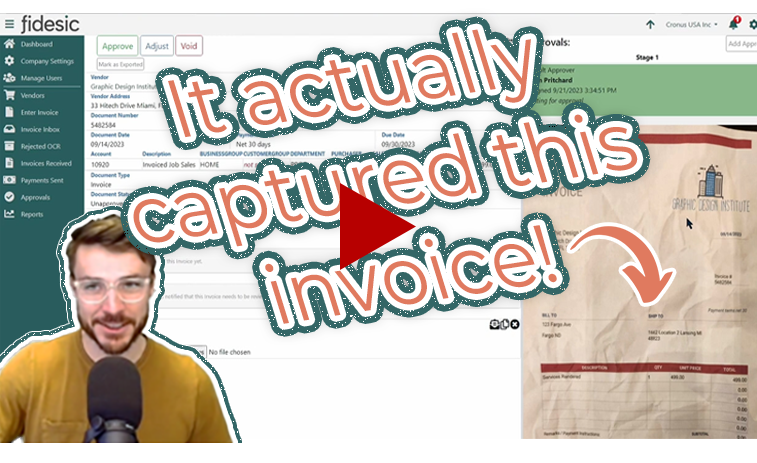
AI invoice capture. MagiCapture is Fidesic's AI invoice capture tool. It uses template-free OCR, so new vendors do not require setup. Users can process invoices on day one and reach 99% touchless accuracy by week six, because the system learns with each invoice processed. Capture can be organized by location, which supports multi-entity teams.
Sarah S., a controller at a mid-market company, wrote in a G2 review, "Fidesic's OCR is some of the best that I have seen."
Invoice approval workflows. RouteWise is a visual workflow editor for building approval routes. Location-based routing sends invoices to the right approvers. Approvers can act from a web browser or directly from email, and locations can manage their invoices without additional ERP licenses.
Vendor payments. JustPay handles batch vendor payments by ACH or paper check directly from the ERP. Positive Pay is available to secure check fulfillment, and the GL updates automatically. VendorVault gives vendors a self-serve portal to submit invoices and check status, so AP teams spend less time on vendor calls.
Multi-entity management. Fidesic connects directly to Binary Stream Multi-Entity Management and supports payables across lines of business, bank accounts and locations in one place. Franchises and multi-location enterprises use this structure to keep each entity organized while maintaining central control. Fidesic customer Kim Bernard with First Atlantic said, “We've been able to place more ownership on the multiple entities to research their own invoices when they or their vendors have questions.”
Measurable efficiency. Compared to less effective automation, Fidesic can reduce monthly invoice processing time by half, a 50% reduction. The gain comes from touchless capture, automatic routing and batch payments working together inside the ERP.
Simple pricing and setup. Fidesic does not charge implementation fees and uses set per-user pricing. A free tier covers 100 invoices for three users and has no time limit, which gives teams a low-risk way to test real invoices in their own ERP.
Tailored onboarding that feels simple. Fidesic enables teams to get set up in just a few weeks without friction. The simplicity clients feel does not mean the system lacks sophistication. Fidesic takes the time to understand each user's specific needs and accounting structures inside their Dynamics system, and that focus on deep integration produces an implementation that is faster and a solution that works better.
What customers say
Verified reviewers on G2 rate Fidesic 4.8 out of 5 across 12 reviews. Read all Fidesic reviews on G2.
- Sarah S., Controller, titled her G2 review "Fidesic saved our sanity!" and noted that the system routes invoices automatically to the assigned AP coordinator and integrates directly with her accounting software.
- Cristina D., a small business reviewer, rated Fidesic 5 out of 5 in her G2 review and highlighted the "ease of platform view of open invoices."
- Pamela Francis, AP Manager at Badger Paperboard, shared her experience in the Badger Paperboard case study.
- Brittany Blackmon, Accounting Manager at Mammoth Holdings, reported time savings, better accuracy and a smoother audit process after moving from GP to Business Central with no AP downtime. Read the Mammoth Holdings case study.
How to choose the right platform
Use this checklist when evaluating accounts payable automation software for a Dynamics environment.
- Confirm the integration method for your exact ERP version
- Test AI invoice capture with your own invoices, including messy ones
- Ask for a measured touchless accuracy rate and the time it takes to reach it
- Build one real approval workflow that reflects your entity structure
- Run a sample payment batch through to ERP posting
- Ask how the platform handles multiple entities, bank accounts and locations
- Review pricing for per-user fees, implementation costs and volume limits
- Speak with a reference customer who runs multiple entities on Dynamics
A platform that passes all eight tests will fit your team far better than one chosen on feature lists alone.
Conclusion
Multi-entity Dynamics teams need more than generic AP automation. The best fit combines direct ERP integration, accurate AI invoice capture, flexible approval workflows, built-in vendor payments and real multi-entity support. Even better is a provider that pairs these with tailored, guided onboarding. General platforms like Tipalti, BILL and Stampli are worth evaluating, but Dynamics teams should test how well each one fits GP or Business Central before deciding.
Fidesic was built for exactly that environment. Start with the free plan, run real invoices through the system and see how it fits your entities.
FAQs
-
Fidesic is accounts payable automation software built specifically for Microsoft Dynamics GP and Dynamics 365 Business Central. It combines native ERP integration, AI invoice capture, location-based approval workflows, built-in vendor payments and direct integration with Binary Stream Multi-Entity Management. General platforms like Tipalti, BILL and Stampli are also worth evaluating, but Dynamics teams should test how well each one fits GP or Business Central before deciding.
-
Dynamics users get the most value from a platform built inside the ERP rather than connected to it. Fidesic is written in the native programming languages of both systems. It uses AL for Business Central and Dexterity for GP, so it works without middleware, flat files or Integration Manager. It supports any version of GP or Business Central.
-
Native integration means fewer sync errors, faster GL updates and less IT overhead. Weak integration is one of the most common reasons teams switch platforms. Roughly one third of Fidesic’s new clients cite a weak or failing ERP integration as a top reason they are looking to move to Fidesic.
-
Multi-entity teams need a platform that handles multiple companies, bank accounts and locations without duplicating setup or buying extra ERP licenses for every approver. Fidesic is built for multi-location and multi-entity organizations. It offers location-based invoice capture, location-based approval routing, entity-restricted visibility and payments from multiple accounts across locations, all managed from central accounting.
-
Yes. Fidesic integrates directly with Binary Stream Multi-Entity Management for both Dynamics GP and Business Central. Tipalti, BILL and Stampli also reference support for Binary Stream. BILL’s support for Business Central is currently in beta.
-
Fidesic, Tipalti, BILL and Stampli all offer AI invoice capture. Fidesic’s MagiCapture uses template-free OCR, so new vendors need no setup. Invoices are captured by location and routed through RouteWise, a visual workflow editor that supports location-based routing and multi-stage approvals. Approvers can act from a web browser or email without an ERP license.
-
Fidesic customers can process invoices on day one. Full rollout usually completes within one month, and customers reach 99% touchless accuracy by week six as the system learns from each invoice.
-
Compared to less effective automation, Fidesic can cut monthly invoice processing time in half, a 50% reduction. The savings come from touchless capture, automatic routing and batch payments working together inside the ERP.
-
Fidesic, Tipalti, BILL and Stampli all include built-in vendor payments. Fidesic’s JustPay sends ACH and paper checks directly from Dynamics with Positive Pay for check security, and the GL updates automatically.
-
BILL ended direct sync support for Dynamics GP in December 2023. GP users can only connect through flat file integration for batch posting. BILL’s Business Central sync supports the cloud version only.
-
Fidesic offers tailored onboarding that includes a process optimization consultation. The team reviews each client’s accounting structure inside Dynamics before setup, which leads to a faster implementation and a better fit. Teams with simpler needs can also use a self-start quick setup. There are no implementation fees.
-
Some text over here to answer the question
-
Yes. Approval routes, coding rules, dimension structures and reporting views can all be adjusted. Fidesic's team is able to respond quickly to to unique needs and build solutions weeks.
-
Yes. Fidesic Free covers 100 invoices for three users with no time limit. Teams can test real invoices in their own Dynamics environment before committing.
-
Fidesic holds a 4.8 out of 5 rating on G2. Pamela Francis, AP Manager at Badger Paperboard, said Fidesic’s free version offered more than other solutions provided during a full implementation, and that the team knows the ins and outs of Business Central.
-
Confirm the integration method for your exact ERP version. Test AI invoice capture with your own invoices. Ask for a measured touchless accuracy rate and the time it takes to reach it. Build one real approval workflow for your entity structure. Run a sample payment batch through to ERP posting. Review pricing for per-user fees, implementation costs and volume limits. Then speak with a reference customer who runs multiple entities on Dynamics.