


Let's talk about something that's been hiding in plain sight in Dynamics GP that could make your life a whole lot easier. If you're juggling accounts payable across multiple entities, you know the drill – click here, post there, switch modules, repeat... it gets old fast. That's where Series Posting comes in, and I’m usually shocked when I find out this isn’t a more well known thing in GP.
So What Exactly Is Batch Series Posting?
It's pretty straightforward – Series Posting lets you grab batches from different posting areas in GP (like Financial, Sales, Purchasing, whatever you need) and post them all at once. No more hopping around between different series screens. We all know that GP has it’s pros and cons, and navigating between dozens of windows is definitely not a strength, but with Series Posting you can minimize the time you spend bouncing around.
Why this matters ESPECIALLY for Multi-Entity Management
If you're managing several entities in GP, this feature is about to become your new best friend for a few reasons:
1. One-Stop Batch Posting
Here's the thing – with Fidesic, we import invoices and automatically create entity-specific batches. But then what? We don’t do this to arbitrarily create more work, we do this to follow the best practices for posting MEM batches. With Series Posting, your team can review and post ALL those batches in one go. No more clicking through each entity separately while juggling multiple windows.
2. Get Hours of Your Life Back
Remember all that time you spent jumping between different GP screens to post batches? Well those days are gone. One action instead of twenty. Your future self will thank you, especially during those month-end crunches when every minute counts.
3. See Everything at Once
There's something satisfying about seeing all your pending batches in one place. Series Posting gives you that bird's-eye view across all series, so you know exactly what you're posting. Month-end close across multiple entities suddenly becomes way less stressful.
Using Series Posting in Invoice Processing (It's Super Simple)
- If you are using Fidesic you will first want to Import your invoices through Fidesic (which creates nice, tidy entity-specific batches)
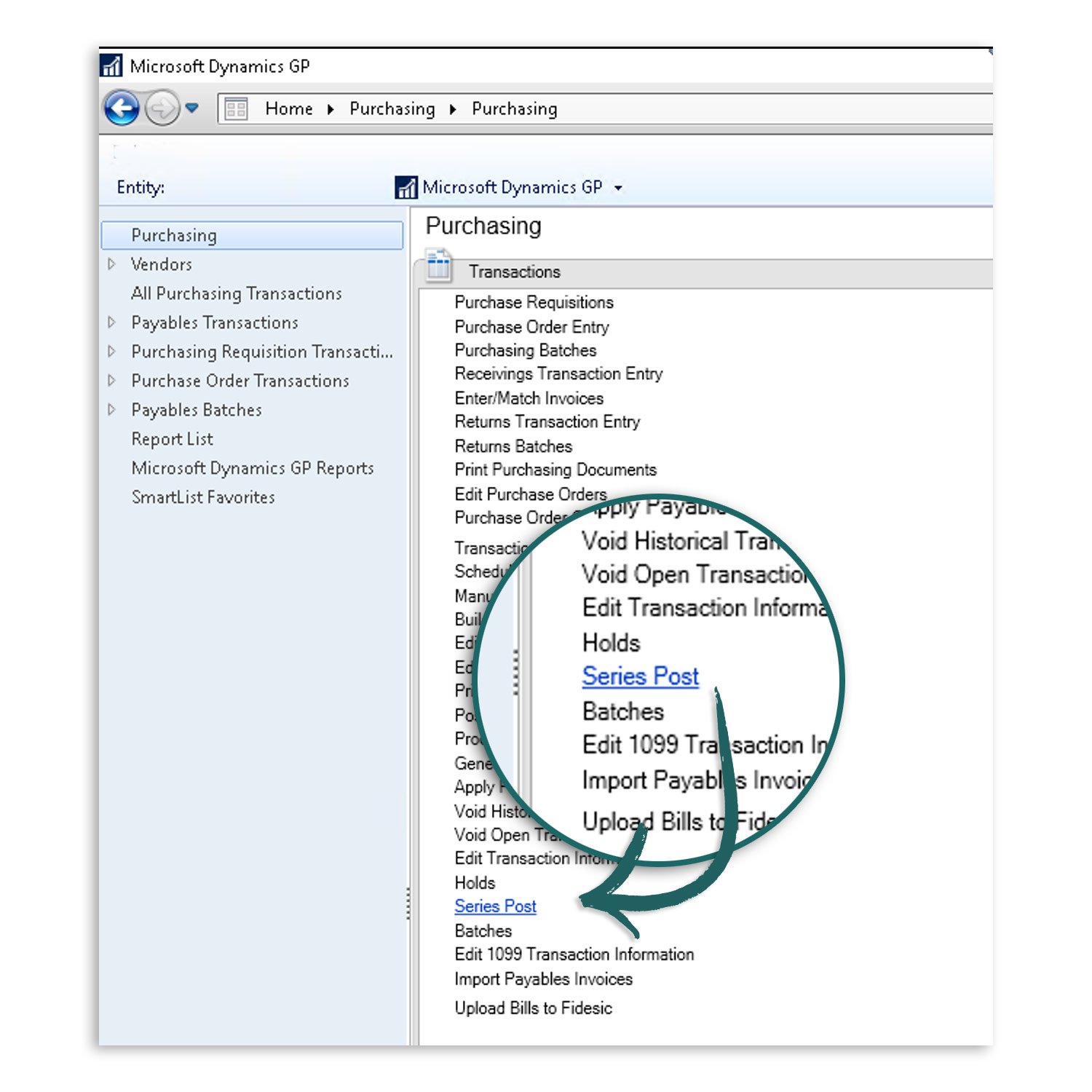
- Head over to Microsoft Dynamics GP open your Purchasing module Purchasing > Series Post
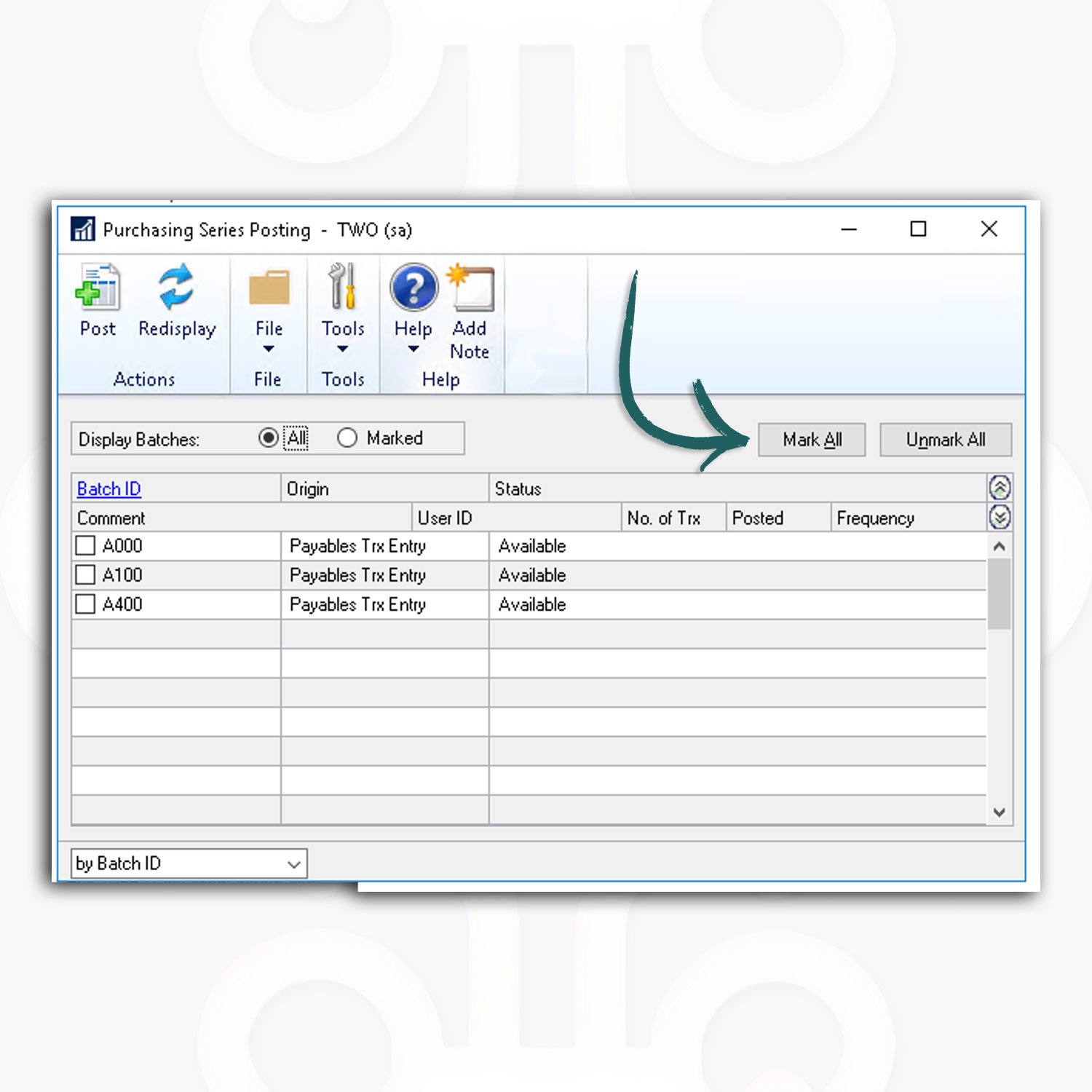
- Pick the batches you want to post
- Give everything a quick once-over
- Hit post and go grab some coffee while GP does its thing
Check the boxes next to the batches you want to post...
Real Talk: What This Means For Your Team
Picture this: You're managing AP for five different entities (which plenty of our customers do). Without Series Posting, you'd be:
- Clicking into each entity separately….
- Posting batches one...at...a...time
- Keeping a mental checklist of what's been posted, or even worse- having to click through each batch just to get a handle on what is happening.
With Fidesic creating those batches automatically and Series Posting letting you post them all at once, you're potentially shaving hours off your workweek. That's not just efficiency – that's getting part of your life back.
Some Quick Tips to Make This Even Better
- Name your batches consistently so you can quickly spot which entity is which. We’ll automatically add the Entity Code as a prefix to the batches for you to make this a bit easier, so make sure you give it a good starting point.
- Set up a quick review checklist before mass posting (just good practice)
- Figure out your posting schedule – daily might work better than weekly for some of you
- Use Fidesic's reporting to keep your auditors happy with clear trails across entities
Bottom Line
This combination – Fidesic's multi-entity AP automation plus GP's Posting Series is one that can truly make your life a lot easier when it comes to AP invoices.
If you haven't tried this workflow yet, what are you waiting for? Your future, less-stressed self is already thanking you. Reach out to our team if you want to chat about setting this up for your specific environment – we're always happy to help you find those hidden hours in your accounting processes.
