


• Login
  • Contact Us
  • FAQ
Fidesic AP Automation Microsoft D365 Business Central Dynamics GP
Blog
See Plans
Fidesic AP Automation Microsoft D365 Business Central Dynamics GP
  • SOLUTIONS
    • MagiCapture - AI Powered Invoice Capture
    • RouteWise - Visual Workflow Editor
    • JustPay - Simplified Vendor Payments
    • VendorVault - Self-serve Vendor Portal
  • ERP INTEGRATIONS
    • D365 Business Central Integration
    • Dynamics GP Integration
    • Multi-Entity Management
  • RESOURCES
    • Blog
    • On Demand Webinars
    • Events & Webinars
    • White Papers
    • Case Studies
    • Partner Resources
  • PRICING
    • Fidesic For Free
    • Fidesic PRO

Maintaining a Digital Invoice Approval Workflow

Published by kevinp on Feb 29, 2016 12:00:00 AM

Once you've built a digital workflow, it's easy to assume everything is on autopilot. For the most part, this is true. Once you've got an optimally functioning workflow within Fidesic, it should take care of all of your invoice approvals automatically. However, your business will have personnel changes that will require changes to your workflow engine.  The Fidesic AP workflow system is fully editable on the front end of our portal and can be quickly used to make changes. We'll cover three situations that often come up requiring a workflow modification.

Type One- Employee Turnover

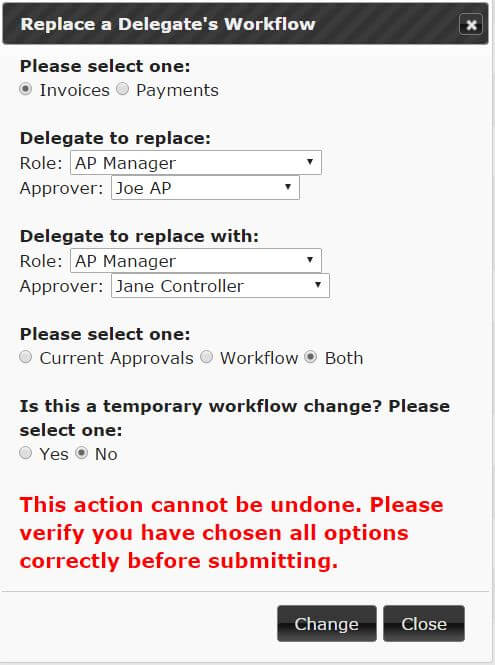
This is the most common type of workflow change, and we've built our system in a way to easily manage these changes. You simply have replaced one person for another.  Within the site, you'll want to swap their position in the workflow and move any pending approvals to the new user's queue. This is best managed through the “delegate list” page and the “replace approval workflow” option. This option allows you to select the replacement staff member and the person they are replacing. From there, you can choose to replace their position in the workflow, as well as move all pending approvals. No need to manually make any changes to the workflow itself.
Type Two- Vacation

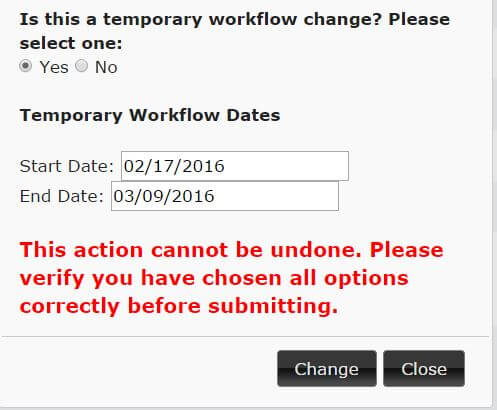
This option is very similar to the change in personnel scenario above, but we will need to set this change as a temporary one. This is easily configured by setting the date range on the replace delegate workflow.
Type Three- Change in business logic

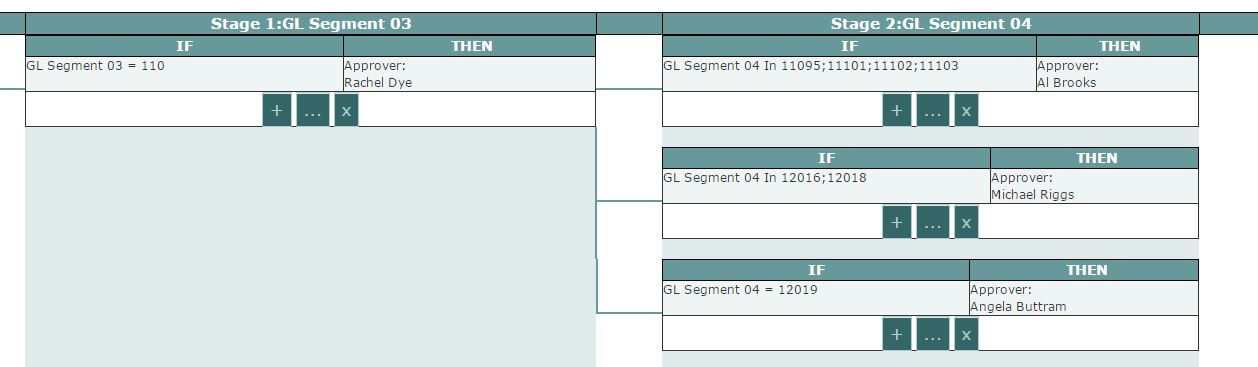
This type of change can also be managed directly from our site. You can add, edit, or remove any rule from our approval workflow engine. You also have the ability to add and remove stages to the workflow allowing a complete change of routing if necessary. If it's your first time making changes like this, it'd be best to contact our support and have them assist you in the process, but after you become familiar, making these changes becomes quite simple.
Maintaining an accurate, up-to-date, workflow is the cornerstone of a labor saving approval workflow system. Once you've mastered these three types of changes, you can quickly modify our workflow engine to match how your business operates.

Back to Blog
  • Tweet

Capture Data from Any Invoice

Fidesic AI invoice data capture demo

Crumpled up invoices. Handwritten invoices. If you can read it, Fidesic can capture it, route it for approval and sync it with your GL. 96% of invoices require zero human touch.

Watch Demo

Most Popular Articles

How Long Does it Take for a Bank Wire Transfer? Top 10 Causes of Delay

How long does it take for a wire transfer? A wire transfer is immediate in most circumstances, but...
Read More

Positive Pay | What is Positive Pay? How Does it work?

In this post we will cover, what is positive pay in banking, how does positive pay work, positive...
Read More

Is ACH Safe? Are ACH Payments Safe Compared to other Methods?

ACH payments are a safe way to pay vendor invoices and employee payroll. According to data from...
Read More

5 Minutes to AP Automation: Quick Setup Invoice Processing for Business Central

When an accounts payable automation solution is a one-size-fits-all solution that wasn't purpose...
Read More

Related Articles

Fidesic 2.0 is Coming Soon!

Fidesic 2.0 beta is on it's way! If you've been a long time user of Fidesic, you'll know that the...
Read More

Fidesic OCR 3 Reasons why it’s the best on the Market for AP Invoices

If you've taken a look at OCR in the past, you know that it has very real limits in terms of...
Read More

Integration Matters- How to Truly Automate Your AP

So you've decided you want to start automating your accounting processes. With many different...
Read More
  • Company

    • About Us
    • FAQ
    • Security & Compliance
    • Contact Us
    • Careers
  • Integrations

    • Microsoft Dynamics GP
    • Microsoft D365 Business Central
    • Binary Stream Multi-Entity
  • Products

    • MagiCapture - AI Invoice Capture
    • RouteWise - Visual Workflow Editor
    • JustPay - Vendor Payments
    • VendorVault - Vendor Portal

Copyright  by Fidesic   Terms Of Use